
How to Set Up Alipay with a Foreign Card (2026)
Bind your foreign Visa or Mastercard to Alipay before your China trip — register, verify your passport, and pay by QR code.
Ten minutes before your trip saves you a lot of awkwardness on the ground.
Alipay is the easiest way for international visitors to pay in China — restaurants, shops, taxis, attractions, even high-speed rail and ride-hailing. Here’s how to get it working with your foreign card, step by step.

Alipay, China’s dominant payment app, is built for foreign visitors — registration takes about ten minutes with a foreign phone number and passport.
What you’ll need
- Your phone and foreign phone number
- Your passport (for identity verification)
- A foreign Visa, Mastercard, JCB or Amex card
- A stable internet connection (do this before you fly)
Step 1 — Download Alipay
Install the Alipay app from your app store (it’s the same app locals use; it detects international users and offers an English interface).
Step 2 — Register with your foreign number
- Open the app → Register.
- Enter your foreign phone number.
- Confirm the verification code sent by SMS.
Step 3 — Verify your identity
- The app will ask for identity verification — enter your name and passport number.
- You may need to take a photo of your passport for confirmation.
- This step is what unlocks full payment features, so complete it properly.
Step 4 — Bind your foreign card
- Go to Me → Bank cards → Add bank card (or the equivalent in your version).
- Enter your card details (Visa, Mastercard, JCB or Amex).
- Confirm a small verification charge if prompted — it’s refunded.
Step 5 — Test a small payment
- Before you travel (or right after landing), pay for something small — a coffee, a snack.
- If the payment goes through, you’re set.
On the ground
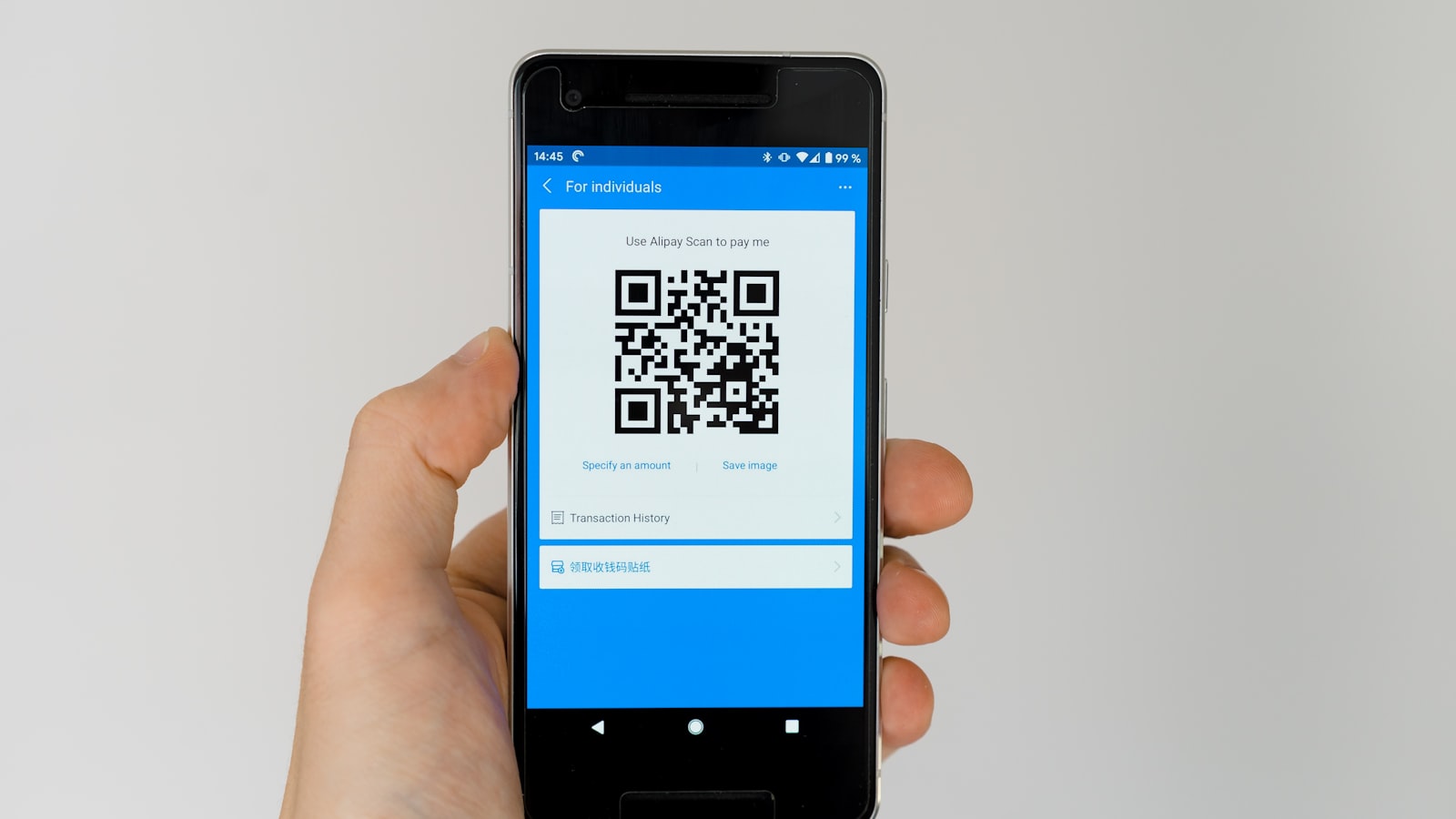
- Pay by QR code: show your payment QR to the merchant, or scan theirs. Both directions work.
- Beyond payments: Alipay now bundles ride-hailing, rail booking and some city transit for visitors.
- Keep a backup: some cash and your physical card cover everything the app can’t.

Once set up, paying is a two-second scan — you show your payment QR to the cashier, or scan the shop’s printed code and confirm the amount.
Tips to avoid problems
- Bind before you fly — best network conditions, passport at hand.
- Watch card notifications — some banks flag the first foreign transaction; pre-notify your bank if possible.
- Check current limits in the app before any large purchase.
- Don’t rely on Alipay alone — see our full guide on paying in China for cash and card fallbacks.
Common scenarios, handled
A few real-world moments make the app click. Buying a coffee or snack: open Alipay, show your payment QR, the cashier scans it, done — the money clears in your card’s currency with a small conversion. Paying at a restaurant: you’ll often scan the restaurant’s QR with your phone instead (look for a printed code on the table or at the counter); enter the amount if asked, confirm, and you’re done. Taxis and ride-hailing: pay in-app after the ride or via the taxi’s QR. At a museum or attraction: many sights now accept Alipay at the ticket window, which beats queuing with cash. The one place the app won’t help is an international card that the merchant’s terminal can’t route — but that’s increasingly rare.

Alipay works at street stalls and night markets too — most vendors display a QR code, and paying is as simple as scanning and confirming the amount.
If something goes wrong
- The payment says ‘declined’ but your card is fine: recheck that the card is set as your active payment method, and confirm you haven’t hit the app’s daily limit for foreign cards.
- Your SMS verification won’t arrive at the airport: use the app’s call-back or offline code options if shown, or switch to airport Wi-Fi and try again.
- A merchant says ‘no foreign cards’: that’s unusual in tourist areas now; most QR payments are processed in-app regardless of where your card is issued. If a terminal insists, offer cash.
- Your passport photo won’t scan: try better lighting and a flat surface; if it keeps failing, the app may accept manual entry of the details instead.
Alipay’s built-in services
Beyond payments, the app now bundles several travel tools that save installing more apps. The transport section lets you book high-speed rail tickets, hail Didi-style rides, and generate a metro transit code for the cities that support it. The taxi shortcut works inside Alipay without the standalone app. There’s also a hotel and attraction booking surface for major sights. Not everything is available for foreign accounts on day one, but the rail booking and transit codes work for most visitors. Where Alipay’s built-in tools fall short, the standalone apps (Didi, Trip.com) fill the gap.
Fees, exchange rates and security
A few things worth knowing before your first payment. Currency: your card is charged in CNY and converted to your card’s currency at the rate applied by your bank or the network — the app shows the approximate charge before you confirm. Fees: small everyday transactions are typically free of service fees for foreign-card users; watch for any per-transaction or annual caps on card binding, which change over time. Security: set a payment passcode inside the app, keep your phone locked, and if your phone is lost, freeze the card through your bank immediately and unlink it in the app as soon as you regain access.
Alipay vs WeChat Pay, briefly
Both apps scan the same QR codes and most shops accept either. Alipay has the smoothest onboarding for foreigners and is the best first choice for a short trip. WeChat Pay lives inside the messaging app, which is useful if you’ll rely on WeChat to contact hotels and businesses. There’s no reason to feel locked in: set up Alipay as your primary, add WeChat Pay if you want the backup, and keep a little cash for the rare vendor that accepts neither. For the full comparison, see our guide to paying in China.
The 10-minute setup, checklist
Before you fly, run through this quickly: download Alipay from the app store; register with your foreign number and confirm the SMS; verify your identity with your passport (name and number must match exactly); bind your foreign card and confirm the verification charge; make a small test payment if possible. Total time: roughly ten minutes on good Wi-Fi. If anything fails, try a different card and recheck that your name and card number match the passport exactly — the two most common snags. Once it works, the app handles payments, transit and rail for the whole trip.
If a setup step fails, the most common fixes are a different card, an exact name/number match with your passport, and trying again over stable Wi-Fi. The official Alipay help center has the current screens. Most travelers finish the whole setup in about ten minutes at home, so there is no reason to leave it to the airport. That one-time effort is why Alipay is consistently the top recommendation for foreign visitors — once it works, the whole country opens up. Combined with a little cash and one international card, that is the entire payment toolkit for a China trip. And once it is running, every subsequent trip to China gets easier — the same account and card carry over. It is a genuinely one-time investment in a smoother trip.
The two QR directions, explained
Alipay’s QR system works in two directions, and knowing the difference saves awkward moments. You show your code: open Alipay’s “pay” tab and a QR-and-barcode fills the screen; the cashier scans it and the payment clears in seconds. This is the standard flow at counters — shops, cafés, supermarkets, museums. You scan theirs: at many restaurants and market stalls you’ll instead scan a printed QR on the table or counter with the in-app scanner, type the amount if the vendor hasn’t preset it, and confirm. If a merchant holds a handheld scanner or has a glass reader at the counter, that’s the “scan your code” direction; a printed paper QR on a table means “you scan us.” Both use the same national QR standard, so the app works with essentially any merchant in China. One habit that helps: keep the payment screen one tap away so you’re not fumbling in a busy line.
Currency conversion and the rate you get
The one piece of Alipay fine print travelers actually feel is the exchange rate. When you pay, the merchant is charged in CNY and your foreign card is charged in your home currency at the rate applied by your bank or card network. Alipay shows the approximate converted amount before you confirm — glance at it, because it’s your best check that the price is what you expected. If your card carries no foreign-transaction fee, the rate is effectively wholesale plus a small margin, which is usually better than an airport exchange counter. If your bank does charge a foreign-transaction fee, it applies as it would to any overseas purchase. For large purchases, it’s worth comparing the in-app rate against what your bank quotes — the difference on a ¥1,000+ item can be meaningful.
Alipay on the longer trip
The longer you stay, the more Alipay does. Beyond scanning, the app bundles ride-hailing (a Didi-style service inside Alipay), high-speed rail booking, metro transit codes for many cities, and person-to-person transfers — handy when one person pays for a group meal and everyone else sends their share in-app. Many attractions now sell tickets through Alipay mini-programs, so you can often skip a ticket window entirely. Not every service is available to foreign accounts on day one, and the feature set changes over time, but the core — pay by QR, book a train, tap through the metro — works for most visitors. For everything it doesn’t cover, cash and a physical card are the fallback; see our guide to paying in China for the full picture.
Last updated: August 2026. App flows and limits change — if a screen looks different, the official Alipay help center has the latest steps.
Frequently Asked Questions
Can I use Alipay without a Chinese bank account or phone number?
Yes. Tourists can register with a foreign phone number and bind a foreign Visa, Mastercard, JCB or Amex card directly. No Chinese bank account is needed.
When should I set it up?
Before you fly. Doing it at home means good Wi-Fi, your passport at hand, and time to test a small payment. Setup also goes faster when you're not juggling it at the airport.
Are there fees or limits on foreign-card payments?
Small transactions are typically free of service fees; transaction and annual caps apply to foreign-card binding and change over time. Check the latest limits in the app before large purchases.
What if my card won't bind?
Try a different card (some banks decline the verification charge), confirm your card allows international online transactions, and re-check that the name and number match exactly. As a fallback, you can still use cash and your physical card.
Is Alipay safe for tourists to use?
Yes — it's the dominant payment method in China and designed for foreign visitors now. Treat it like any payment app: keep your phone locked, and set up the app's own payment passcode.