

Best Translation App for China Travel (2026)
The best translation apps for China — Google Translate, Apple Translate, Youdao and more — plus which ones work offline and which need a VPN.
The language barrier in China is real, but it’s mostly solvable with one good translation app and a little preparation.
English is not widely spoken outside hotels and big-city tourist spots. The good news: Chinese apps and translation tools have improved a lot, and you can get through menus, tickets, taxis and shop conversations with the right app — downloaded before you land.
One good translation app, downloaded with its Chinese-English offline pack before you land, gets you through menus, tickets and taxis.
The short version
- Download two apps before you fly: one foreign (Google Translate or Apple Translate) and one Chinese (Youdao or Baidu Translate).
- Download the Chinese-English offline packs for each while you still have home Wi-Fi.
- Use camera mode for menus and signs, voice/text mode for conversations.
Google Translate — the best all-rounder (with a catch)
- Excellent camera translation for menus, signs and labels, plus strong accuracy overall.
- Offline packs let you translate without signal.
- The catch: online and camera modes need the internet, and Google is blocked on Chinese networks — so you’ll typically need a VPN or a roaming eSIM that routes via your home network.
Apple Translate (iOS) — great for iPhone users
- Built into iPhones; works offline once you download the language pack.
- Handy camera and conversation modes.
- No Google account or VPN required for on-device translation — a solid no-fuss choice.
Youdao (有道翻译官) — the local powerhouse
- A Chinese app built by NetEase, very popular with locals and travelers.
- Works on Chinese networks without a VPN.
- Excellent camera/photo translation for menus and signs, plus conversation mode.
- Interface is partly in Chinese, but it’s easy to figure out; download the English-Chinese pack before you go.
Baidu Translate (百度翻译)
- Similar to Youdao: free, works on local networks, solid camera and text translation.
- A good second option if Youdao is not to your taste.
- Sometimes slightly clunkier for long paragraphs, but fine for short phrases.
Microsoft Translator
- Reliable offline packs and a good conversation mode for back-and-forth with a driver or shopkeeper.
- Works on Chinese networks.
- Less polished camera translation than Google, but dependable for text.
翻译狗 (Translation Dog) — for documents, not day-to-day
- 翻译狗 is mainly a document translation service for files like certificates and contracts, not a menu-scanning tool. If you need a formal document translated while in China (e.g., a visa form), it’s one option — but for everyday travel, stick with the apps above.
How Chinese translation works in practice
Chinese is not a phonetic alphabet language, and that changes how translation apps behave. Written Chinese uses tens of thousands of characters, and a single word can carry several meanings depending on context, so machine translation of Chinese has historically lagged behind translation between European languages. Modern apps handle most of this with neural machine translation, but you will still notice differences between apps and between phrasebooks.
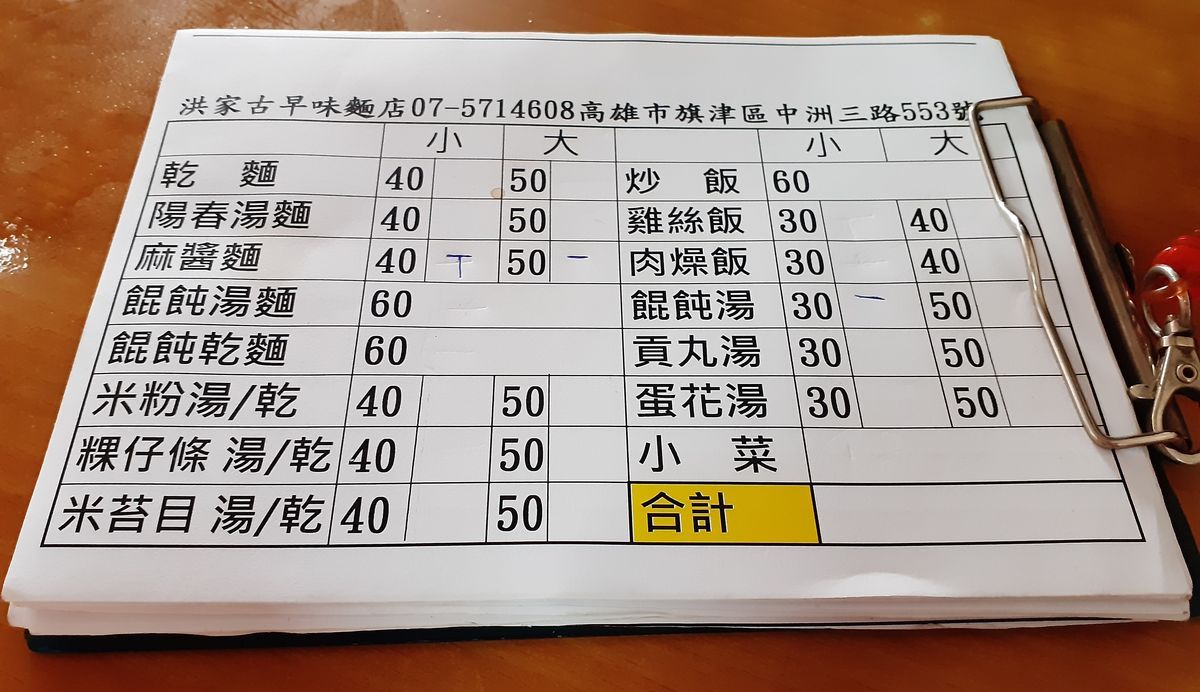
Camera translation reads a printed Chinese menu in seconds — menus and station signs are the sweet spot for on-screen translation.
- Simplified vs traditional: mainland China uses simplified characters, so download the “Chinese (Simplified)” pack rather than the Traditional pack used in Taiwan and Hong Kong.
- Camera translation works best on printed text: menus and station signs translate well because the characters are printed and clear. Handwritten notes, decorative calligraphy and stylized shop signs can defeat even the best apps — when a menu is handwritten, it is often faster to ask for a picture menu.
- Typing pinyin: if you know the pinyin spelling of a dish or a street name, many apps let you type it and will complete the Chinese characters for you — a handy way to look up places inside Chinese map apps.
- Keep phrases short and simple. Short, standard phrases translate reliably; long, idiomatic sentences can come out garbled.
Common mistakes to avoid
- Installing only one app. Set up both a foreign app and a Chinese app; when one fails (or will not connect), the other usually gets you through.
- Forgetting to download the offline pack. The app is near-useless the moment you have no signal if the pack is missing — download packs at home on Wi-Fi and verify they finished.
- Assuming Google Translate’s online mode will work. Google services are blocked in mainland China. If you did not set up a VPN or a roaming eSIM before flying, the app falls back to offline mode only.
- Typing long paragraphs into text mode. For a real conversation, use voice or conversation mode instead — it is built for back-and-forth and is much faster.
- Relying on machine translation for critical information. Medicine dosages, allergen labels and legal documents need a human translation, not a camera scan.
- Showing a driver the Latin-script version of an address. Taxi drivers need the Chinese characters on screen; keep both versions saved.
A realistic budget
All of the major translation apps are free to download and use for basic text and camera translation, so the software itself costs nothing.
- The apps: Google Translate, Apple Translate, Youdao, Baidu Translate and Microsoft Translator are all free; some offer paid pro tiers or document services, but you will not need them for travel.
- The data: translation apps are light on data once the offline packs are installed, but live camera and voice modes use a connection. A small data plan — roughly ¥50–150 for a week through a local SIM, or a comparable roaming eSIM — covers this comfortably.
- The VPN (only if you want Google’s online features): a reliable VPN for China typically costs a few dollars a month; a roaming eSIM that routes via your home network removes the need for a VPN entirely. See our VPN guide for what to set up before departure.
Practical details
- Install order matters: install the apps and download the Chinese packs while you still have home Wi-Fi; an airport lobby is a bad place to discover a stalled download.
- Check the pack size: Chinese-English offline packs can be a few hundred megabytes each; on a small phone, delete packs for languages you do not need.
- Battery: camera translation is power-hungry. Carry a power bank or a USB-C cable, and lower screen brightness when you are scanning menus all day.
- Update before departure: translation quality improves constantly, and app updates occasionally change how offline packs are stored. Update the apps, then confirm the packs are still installed.
Making conversation mode work
The two-way conversation mode on Youdao and Microsoft Translator is the closest thing to a bilingual assistant in your pocket. Hold the phone toward the other person, speak, and it translates and speaks back — useful for taxi directions, hotel requests and market bargaining. A few tips make it work better:

Bilingual signs appear across China’s tourist districts — a translation app bridges the Chinese characters you can’t yet read.
- Speak in short sentences and pause between them; the apps stumble on long, rapid speech.
- In a noisy street, hold the phone close and speak clearly rather than shouting over the traffic.
- Keep the volume up so the other person hears the Chinese clearly.
- Have your destination or request written in Chinese as a backup. Voice translation fails occasionally, and a note always works — keep it in your phone’s notes app alongside the address.
Practical tips
- Download offline packs at home for every app you plan to use — Chinese packs can be a few hundred MB each.
- Save key phrases offline in a notes file: “Where is the train platform?”, “No MSG, please”, “The bill, please”, your hotel address in Chinese.
- Keep your hotel name and address in Chinese characters on your phone — show it to taxi drivers and at help desks.
- Use camera mode on menus but double-check anything safety-relevant (medicine instructions, allergen info).
- Be patient with accuracy. Translations are usually good enough to be understood, rarely perfect.
- Combine with data: a working eSIM makes live translation reliable; if you’re relying on free hotel Wi-Fi, offline packs are your backup.
Translating in specific situations
- Menus and food: camera mode on any of the apps handles most menus. For street food, save a few phrase cards in Chinese (“no spice”, “vegetarian”, “takeaway please”) to cut down on pointing.
- Taxis and ride-hailing: keep your destination address written in Chinese on your phone, and use conversation mode if you need to explain something to the driver.
- Train stations: signs at major stations are bilingual, but announcements are in Chinese. Camera-translate the departure board when you need help — and see our train guide for how e-tickets, gates and platforms work.
- Hospitals and pharmacies: use text translation to describe symptoms or read a medicine label. Accuracy matters here, so type slowly and double-check anything critical.
- Paying: camera-translating a bill or receipt is easy; for how mobile payment works alongside, see how to pay in China.
What to set up before you fly
- Install two translation apps (one foreign, one Chinese).
- Download Chinese-English offline packs for both.
- Save your hotel address and a few key phrases in a notes file, in Chinese.
- Test camera translation on a Chinese menu or website at home so you know how it works.
- If you want Google Translate’s online features, set up your VPN or roaming eSIM first and test it before departure.
Last updated: August 2026. Apps and their offline/online features change — update your apps and verify offline packs before you fly.
Frequently Asked Questions
Does Google Translate work in China?
The app works offline if you download the Chinese language pack first. Online translation, camera mode and voice mode need the internet, and Google services are blocked on local networks — so you'd need a VPN or a roaming eSIM that routes via your home network.
Which translation app works without a VPN?
Chinese apps such as Youdao (有道翻译官), Baidu Translate and Microsoft Translator run on local networks without a VPN. Download their Chinese-English packs before you travel so they work even when signal is poor.
Can I translate a Chinese menu with my camera?
Yes. Google Translate, Apple Translate, Youdao and Baidu Translate all have camera/photo mode that overlays a live translation on Chinese text — ideal for menus, train station signs and medicine labels. Accuracy is good but not perfect, so double-check critical things like medication dosages.
Do I need the internet for translation apps in China?
For offline use, no — download the Chinese-English offline pack for each app before you fly and it translates without signal. Live camera and voice modes generally need a connection, so pair the app with an eSIM or Wi-Fi.
What about conversation mode for speaking with taxi drivers?
Youdao and Microsoft Translator both have a two-way conversation/voice mode you can show the driver. Keep a note with the address in Chinese characters on your phone — many drivers find written Chinese easier than listening to a voice translation.